
After 17 years in the App Store, I’ve renamed Pay Off Debt by Jackie Beck to Toboggan! You can download the Toboggan: Debt Payoff Planner app here.
No one knows what keeps you motivated like YOU do. That’s why Toboggan lets you create your own take-action debt payoff plan..

With Toboggan, there’s no more wading through conflicting opinions about what the “best” way to pay off debt is. No more wondering which method might cost you the most interest, or get you out of debt the fastest.
Instead, you get to see for yourself based on your exact debt situation and selections. Choose from the debt snowball method, the debt avalanche, or something else entirely.
Track your progress with the payoff plan of your choice. Watch credit cards, car loans, student loans, and more go down. Plus, you’ll feel a little burst of motivation every time you see that “PAID” icon on your phone.
Would you love to watch your debt go down and know exactly when you could be debt free? Then Toboggan is for you!
- Ready to get started? Click here to get Toboggan!
Toboggan can help you:
-
Decide on the repayment order that works best for you. Choose from the debt snowball method, the debt avalanche, or something else entirely.
-
Use the payoff strategy of your choice to track your debt and progress, resulting in the most interest saved.
-
Stay motivated by focusing on the real reason you’re getting out of debt. (You even add a picture of your kids to Toboggan, or a house, or whatever photo symbolizes your “why”.)
-
Organize your debts in one handy spot. This makes it easy to stay focused and celebrate every bit of progress as you work to become debt free!
Plus, it might even help you feel great too!
Speaking as someone who’s paid off over $147,000, I can tell you that paying off debt feels awesome! And I’m not the only one who feels that way. As one user said:
“I just paid off my first debt thanks to this app! I swear being able to watch my % increase and my amount due decrease really helped me stick to the snowball plan. Just mailing monthly checks, and reading the statements isn’t as rewarding as this plan. Now paying off my debt feels better than shopping!”
Did you catch that last part? Paying off debt feels better than shopping. That really is awesome.
- Now’s the perfect time to start moving towards debt freedom. Click to get Toboggan in the App Store today!
Here’s how Toboggan works
It’s simple really. You input the numbers from your exact debts so that they’re organized in one place. Decide how much extra you’ve got to put toward debt each month, and choose the order you want to pay them off in.
Then you try things out just by changing a few options while it does all the calculating for you. You’ll see how much interest you can save, and how quickly you could get out of debt.
(I recommend Lowest Balance first for most people, since it’s super motivating. That’s the debt snowball method, and it’s on by default because it works so well. See this post if you want to know why. But you can try things out for yourself in the app.)
Not sure what order will get you out out of debt the fastest? You don’t have to guess any longer. You can quickly check them all out and look at the results that will come when you carry out a particular plan. (Hint: The fastest one is the one you will stick with. You know yourself best!)
If you want to see your numbers using a debt avalanche, just turn the debt snowball off and set the order to highest interest first. If you want to pay your mom back first, you can do that too.
Why use the Toboggan app?
It’s made by someone (me) who truly wants to see you succeed, not just a random app developer. Someone who has been there and done that; who knows exactly what it takes to become debt free.
Because it can help you stay motivated, stick with it, and succeed.
There are no hidden charges or locked features with Toboggan.
You can use it forever with no hidden fees once you’ve bought it. (There are no monthly charges like some of the so-called “free” apps have if you actually want to use their features.) I also won’t try to sell you loans or credit scores in the guise of helping you. I don’t sell your data. In fact, I can’t see what you put in the app at all. Your get-out-of-debt plan is yours, not something for someone else to profit from.
In other words, there are no ads, no account sign-ups, no bank connections, and zero data collection with Toboggan. The focus is solely on helping you succeed.
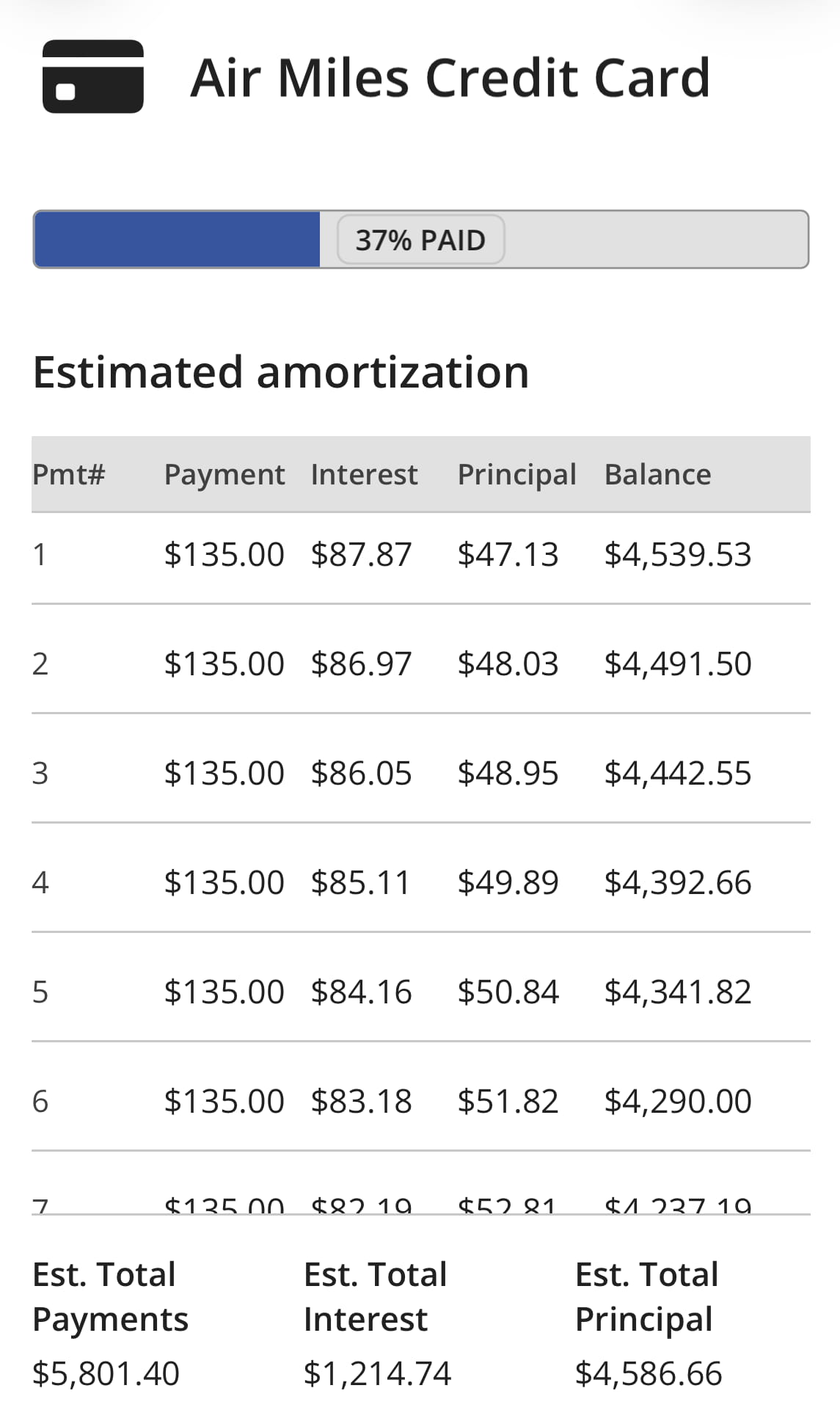
You get detailed insights.
The amortization table for each debt lets you see how your debt will be paid off over time. You’ll be able to see how much of each payment goes to interest and how much goes to reduce the balance.
This was an oft-requested feature, because many people would input their info, take one look at their planned debt free date, and think “That can’t be right! There’s no way everything could be paid off that quickly!”. Oh, but it can — if you’re taking advantage of the debt snowball method — and the amortization table shows you how.
Your information is organized and easy to access
You can see frequently viewed information right on the Debts screen, but you can also dive deeper to view more details about each debt, and you can tap the Summary icon to get the summary of how you’re doing on your overall debt snowball.
That includes your planned debt-free date and the estimated time left before you can scream “I’m debt free!”.
You’ll can also share your information across devices if you’re using the same Apple ID. (By uploading it to the cloud.) And you’ll be able to re-downloaded the info you last uploaded if you need to reinstall the app for any reason.
You get more resources
A big part of getting out of debt is staying inspired, so the app includes a Resources section with links to blog posts about getting out of debt.
Get Toboggan now from the App Store!
Want more details? You can do all of these things with the app:
- Organize your debt in the order of your choice: using the debt snowball method (from lowest balance to highest balance), using the debt avalanche method (from highest interest rate to lowest interest rates), or in any custom order of your choosing.
- Use the Debts screen to view progress bars like this on each debt for motivation and encouragement:

- View the starting and current balance of each debt individually, plus the total starting debt and the total current balance information.
- See the estimated time left to pay off each individual debt.
- View the “planned debt-free date” on the Debts screen. It’s an estimate of when all the debts listed will be repaid. This date will change based on what you input in the Settings > Additional Amount field.
- View your planned monthly payment and the date you last recorded a payment for each debt right on the Debts screen.
- View the payment history for each debt, starting with the first payment you record. You can delete payments you’ve recorded too, making it easy to play around with.
- Turn the snowball off if you would like to compare how long it would take you to pay off all of the debts if you were NOT using the snowball.
- Email your information to up to four different email addresses. (Your list of debts, starting debt amount, current balance, minimum payment amount, due date, and progress made.)
- Password protect the app if desired.
It’s easy to record payments and make changes too:
- The Debts screen allows you to record the payments you have made by tapping the Minimum or Custom buttons.
- Recording a minimum payment on the first debt in your snowball will also automatically record the additional amount you entered on the Settings screen.
- If you want to temporarily change the payment amount you are recording, use the Custom button. Otherwise, you can change the minimum payment amount on a debt by tapping the debt to edit it.
- Use the Settings screen to set the additional amount you will put toward the first debt in your list. Change the amount any time you like.
- A debt’s current balance is automatically estimated based on information input by you. (However, please note that this is ONLY an estimate. To keep exact records, consult your statements and enter the actual current balance manually on the Edit Debts screen.)
- Set payment reminders that will appear when the app is running, if desired. Once the due date has passed, the reminder will no longer appear.